
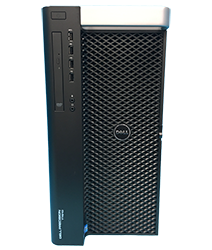
Helping You Create Your Custom Gaming Computer
Dell Precision 7960 Tower Gaming Computer and Hardware Upgrade Guide
The Precision T7960 has all the base components to be converted into a high-end gaming computer. The Precision T7960 is a single socket Xeon based workstation. The T7960 Supports up 4TB DDR5 4800Mhz memory and 8 x 3.5″ Hard Drives. The T7960 also has an optional 2200W Power Supply that allows you to install amazing gaming graphics cards. Let us show you how you can build an effective Precision T7960 Gaming Computer.
Where to buy?
If you haven’t already acquired a Precision T7960 we’d recommend checking out a company called Serverworlds. They sell the T7960’s cheap and they provide free ground shipping to the lower 48 states. You can also try to snag them cheap on Ebay. However, Ebay can be a bit of a gamble because you never know what you are going to get.
The goal is to purchase the T7960 with a good processor(s) and memory already installed and then you can source the graphics cards, hard drives, and other optional components from other sources.

What Processor(s) should I get?
High Clock speed CPU’s are the way to go.
Recommended Processor:
Up to 1 x Intel XeonW5-3425 16C 3.2Ghz 30MB | 4.6Ghz Max Turbo Frequency (SRM35)
Up to 1 x Intel XeonW5-3435X 16C 3.1Ghz 45MB | 4.7Ghz Max Turbo Frequency (SRM34)
Up to 1 x Intel Xeon W5-3525 16C 3.2Ghz 45MB | 4.8Ghz Max Turbo Frequency (SRN77)
Not a gamer and need more Cores?
High Core Count Processors:
Up to 1 x Intel Xeon W9-3475X 36C 2.2Ghz 82.5MB | 4.8Ghz Max Turbo Frequency (SRM30)
Up to 1 x Intel Xeon W9-3575X 44C 2.2Ghz 97.5MB | 4.8Ghz Max Turbo Frequency (SRN72)
Up to 1 x Intel Xeon W9-3495X 56C 1.9Ghz 105MB | 4.8Ghz Max Turbo Frequency (SRM2Z)
Up to 1 x Intel Xeon W9-3595X 60C 2.0Ghz 112.5MB | 4.8Ghz Max Turbo Frequency (SRN71)

How much Memory should I get?
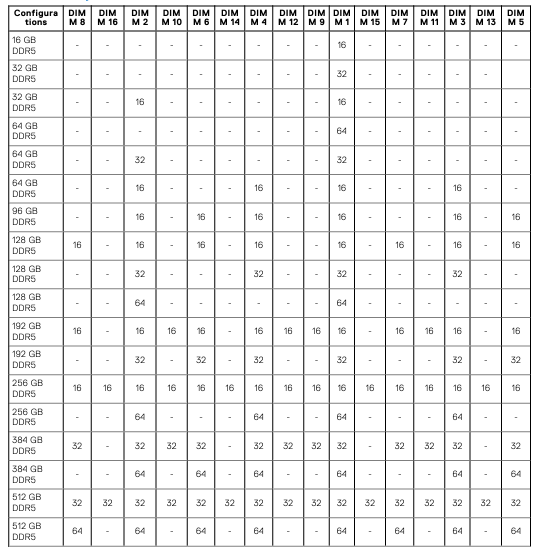
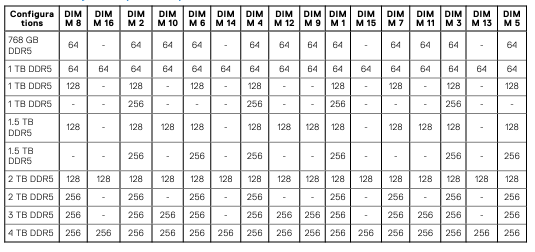
The base line should be a minimum of 32GB of memory. However, 64GB to 128GB that would be ideal.
Memory PNs:
16GB 4800Mhz 1Rx8 DDR5 Reg Module (1V1N1)
16GB 5600Mhz 1Rx8 DDR5 Reg Module (5DR48)
32GB 4800Mhz 2Rx8 DDR5 Reg Module (W08W9)
32GB 5600Mhz 2Rx8 DDR5 Reg Module (P8XPW)
64GB 4800Mhz 2Rx4 DDR5 Reg Module (J52K5)
64GB 5600Mhz 2Rx4 DDR5 Reg Module (58F8N)
96GB 5600Mhz 2Rx4 DDR5 Reg Module (FFX9N)
128GB 5600Mhz 4Rx4 DDR5 Reg Module (GD7H7)

What Hard Drive should I get?
Ideally you would want to have a NVME.2 Solid State Drive as your boot device as well as storage for faster read speeds. If you are limited on budget, you could go with a small NVME.2 SSD for your boot device and a larger capacity 7.2K SATA drive to hold your larger files/programs/games.
The T7960 does not have an NVM.2 Slot on the system board.
NVMe Adapters:
Precision 7960 Tower NVME Backplane (2YDRX)
Precision 7960 Tower NVMe Cable for Slots 0,1 (6CDC9)
Precision 7960 Tower NVMe Cable for Slots 2,3 (0KDMN)
Precision 7960 Tower NVMe Tray (5C9PM)
Dell Ultra SSD M.2 PCIe x4 Quad Port Adapter (400-BPJP)
Recommended NVME.2 SSDs:
Samsung 990 EVO – 1TB PCIe NVMe – M.2 Internal SSD (MZ-V9E1T0B/AM)
Samsung 990 EVO – 2TB PCIe NVMe – M.2 Internal SSD (MZ-V9E2T0B/AM)
Samsung 990 EVO Plus – 4TB PCIe NVMe – M.2 Internal SSD (MZ-V9S4T0B/AM)
Recommended large Capacity SATA Drives:
Seagate 8TB IronWolf SATA HDD 7.2K 6Gb/s 3.5″(ST8000VNZ04)
Seagate 12TB IronWolf SATA HDD 7.2K 6Gb/s 3.5″ (ST12000VN0007)
Seagate 16TB Exos SATA HDD 6GB/s 7.2K 3.5″ (ST16000NM000J)
Seagate 24TB Exos SATA HDD 6GB/s 7.2K 3.5″ (ST20000NM007D)
Raid Controllers:
Working on this….

What Graphics Card should I get?
The Precision 7960 features a standard 1400W Power Supply. The 1400W Power Supply will give you pretty much endless options for graphics cards.
Precision 7960 Tower 1400W Power Supply (VYK78)
Precision 7960 Tower 2200W Power Supply (VG3M6)
Recommended Graphics Cards:
NVIDIA GeForce 4060Ti 8GB Graphics Card
NVIDIA GeForce 4070 12GB Graphics Card
NVIDIA GeForce 4070TI 12GB Graphics Card
NVIDIA GeForce 4080 12GB Graphics Card
What type of Monitor should I get?
Ideally it would be nice to get a monitor with a 144Hz or 244hz refresh rate or better monitor. However, it really depends on the games you play. If you play first person shooter games a 144hz or 240Hz or better monitor is a must. If you play other games that do not require quick response time then a 60hz monitor should work fine.
Recommended Monitors:
Acer XZ270 Gaming 27″ 240Hz 1MS Gaming Monitor
ASUS TUF Gaming VG279QM 27″ 280Hz 1MS Monitor
Recap:
Using the criteria above you can help you build a high-end gaming system using a Precision 7960 Workstation.
Sample Configuration:
Precision 7960 Tower Workstation
1 x Intel Xeon W5-3525 16C 3.2Ghz 45MB | 4.8Ghz Max Turbo Frequency
64GB PC4800Mhz (4 x 16GB)
Samsung 990 2TB NVME.2 SSD w/PCIe Adapter
NVIDIA RTX 4060 TI 8GB Graphics Card
1 x Gigabit + 1 x 10GB Copper Onboard
1400W Power Supply
11 Pro 64Bit
Videos:
Precision 7960 Tower RTX A4500 Game Testing
Precision 7960 Tower Processor, Memory, and Graphics Card Install
We have tested this system with games like Dota 2, CS2, PubG, Overwatch 2, DayZ. The frames can range from 90FPS to 200FPS depending on the game and settings that you choose. The system was tested using a 240Hz 24.5″ Asus Monitor.
